Match List-I with List-II
List-I
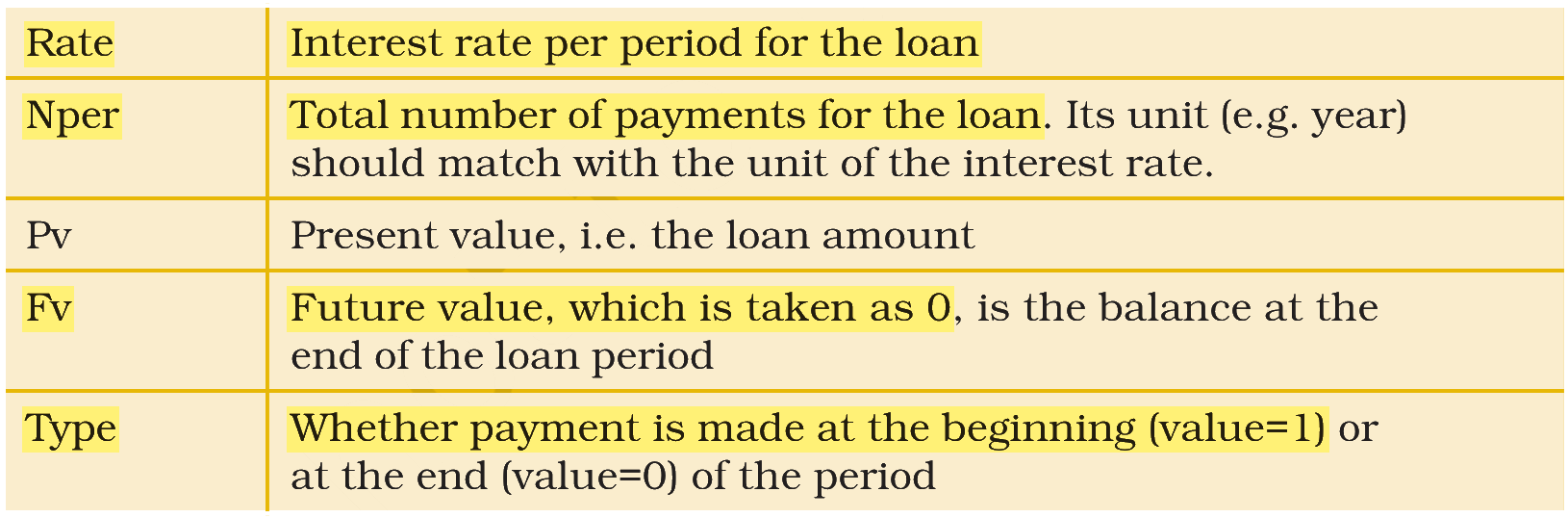
(A) Interest rate per period for the loan
(B) Total number of payments for the loan. Its unit (e.g. year) should match with the unit of the interest rate
(C) Whether payment is made at the beginning (value=1) or at the end (value=0) of the period
(D) Future value, which is taken as 0, is the balance at the end of the loan period
List-II
(I) Type
(II) Rate
(III) FV
(IV) Nper
Choose the correct answer from the options given below:
Answer & explanation
Correct answer: option 2
The correct answer is Option (2) → (A) - (II), (B) - (IV), (C) - (I), (D) - (III)
Excel’s PMT function works out the instalment on a loan from its arguments: rate, number of payments, present value, future value and type.
(A) Interest rate per period for the loan — this matches (II) Rate. Rate is the interest charged for each period, for example the monthly rate for monthly instalments.
(B) Total number of payments for the loan. Its unit (e.g. year) should match with the unit of the interest rate — this matches (IV) Nper. Nper is the number of periods, counted in the same unit as the rate.
(C) Whether payment is made at the beginning (value=1) or at the end (value=0) of the period — this matches (I) Type. Type tells Excel when each payment falls due.
(D) Future value, which is taken as 0, is the balance at the end of the loan period — this matches (III) FV. FV is the balance left after the last payment, which is nil for a loan repaid in full.
NCERT (2026-27 edition):
|